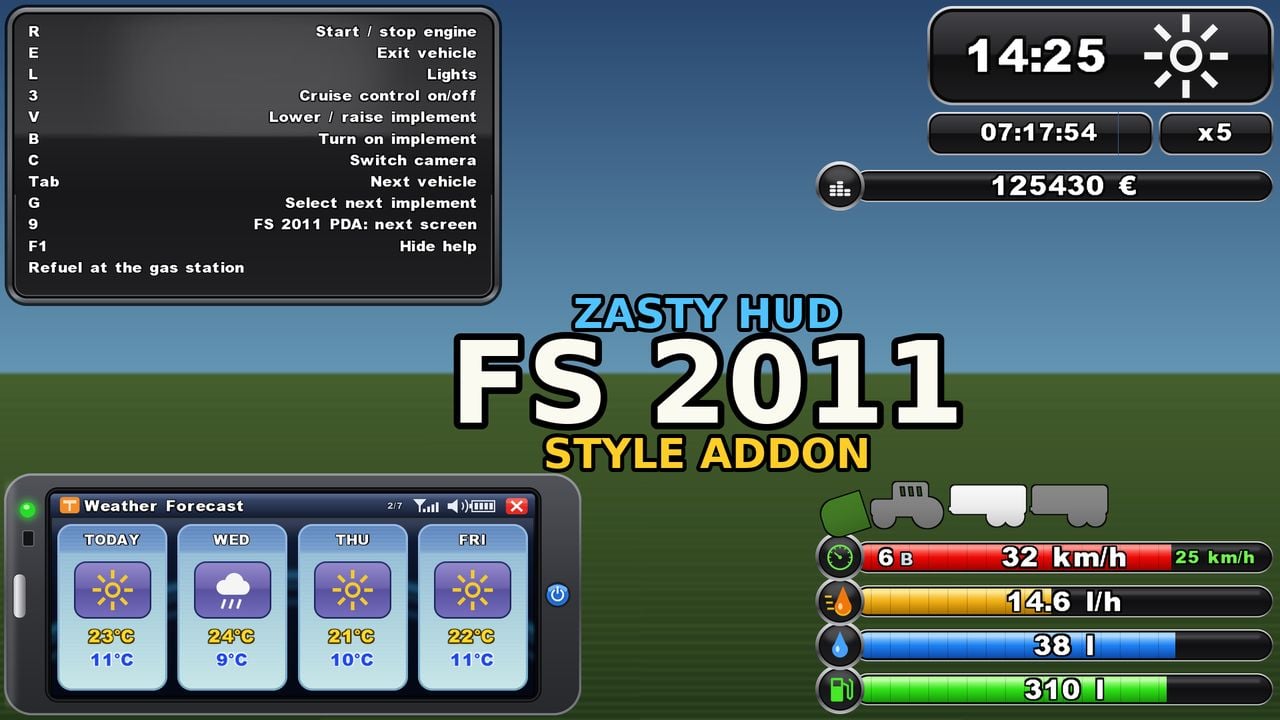
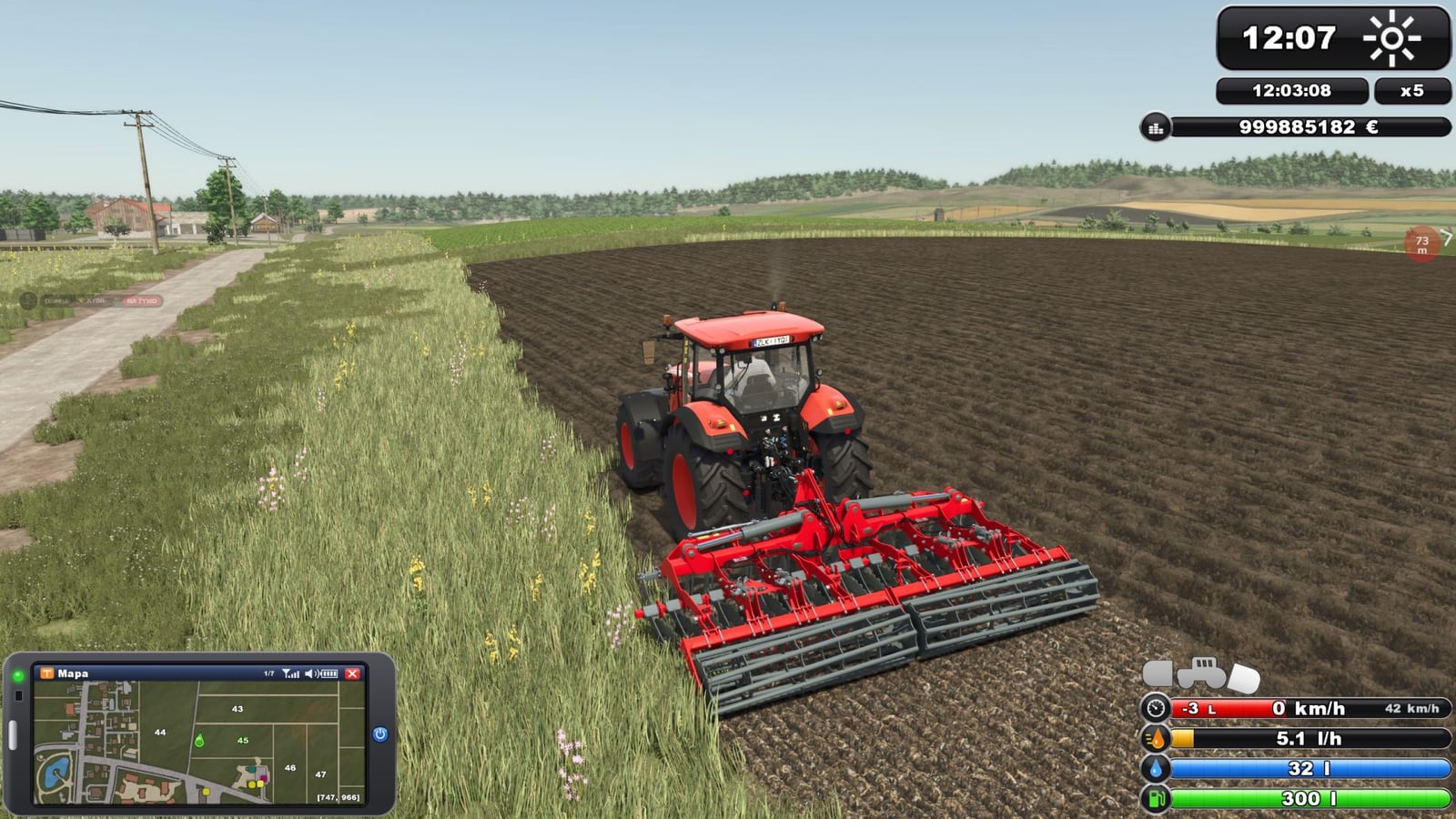
Want your FS25 game to feel like Farming Simulator 2011? This addon for Zasty HUD by Zasty Chalk brings in a third choice, “FS 2011”, alongside “Bar” and “Round” in the Zasty HUD settings window. Turn it on and the FS 2011 HUD takes over the full FS25 HUD, so the elements do not overlap.
Bars (bottom right)
- The familiar FS 2011 stack is here with speed, fuel consumption (l/h), AdBlue and fuel
- On the speed bar, the red fill shows engine rpm. Gear and gear group sit on the left, while the cruise control speed is on the right. The speed icon turns green when cruise control is on
- Fuel consumption is displayed in litres per hour, with 0 shown when the engine is off
- If the vehicle has a DEF tank, a blue AdBlue / DEF bar appears. This covers the base game and AdBlue mods
- The vehicle schema sits above the bars and shows the tractor with front and rear implements. Switched on (B) is green, selected (G) is brighter, and lowered is tilted towards the ground
Clock (top right)
- You get the FS 2011 clock together with its weather symbol
- Real (computer) time and the time scale are underneath
- Your balance is under the clock, whether you are on foot or in a vehicle
PDA (bottom left)
- The PDA replaces the FS25 minimap. Press the game’s minimap key (9) to cycle its screens, or use Left Alt + I. One extra press hides it, and each change plays the PDA beep
- Map shows north up, heading marker, coordinates and field numbers, with your fields in green. It also uses the game’s icons for the shop, selling points, productions and animals
- Weather Forecast gives today and the next three days as FS 2011 day cards, with symbol, max and min temperature
- Prices shows the best price for each crop
- Statistics covers silo storage and animals
- Players is multiplayer only
- Vehicles lists the tractor with all implements and trailers, plus state and fill levels
- Engine gives rpm, load, temperature, gear, direction, speed, operating hours, fuel, AdBlue, consumption, damage, wear and total mass
- Tyres works with the Variable Tire Pressure mod and shows front axle, rear axle, trailer, road/field and inflating/deflating
- Farm includes date, time scale, balance, field, crop, vehicles, farmlands and play time
- In the Zasty HUD window, “PDA size” can be set from 40-100 %. The change happens live
F1 help
- F1 help uses one glossy FS 2011 box, with the key on the left and the action on the right. It grows as the number of actions grows
- In build mode, the shop and menus it moves are put on the right side
More
- The FS25 HUD that gets replaced is hidden completely: speedometer, minimap, fill levels, vehicle schema and time/money box. Notifications and warnings stay
- Variable Tire Pressure’s window is hidden, while its pressures appear on the PDA. The control panel, Ctrl+Alt+U, still works
- Languages: EN, DE, PL, FR, ES, IT, PT/BR, CZ, RU, NL, HU, TR. The addon translates Zasty HUD itself into these languages and fixes language detection in FS25, while Zasty HUD’s files stay unchanged
- Game settings control speed, volume and money: km/h / mph, litres / gallons and currency
- The “Size” setting of the Zasty HUD window also controls the bars and clock
How to use
- Drop
FS25_ZastyHUD_FS2011.zipinto the mods folder next toFS25_ZastyHUD.zip - Activate both mods in the savegame
- Use Left Alt + H and pick Style: FS 2011
- Use 9, or Left Alt + I, to move through the PDA screens
Notes
- Nothing in Zasty HUD’s own files is changed. Remove this addon and Zasty HUD works as before. A saved “FS 2011” style falls back to “Round”. With Bar or Round, the minimap key behaves as usual
- Client side only, in single player and multiplayer. When the game gives no consumption figure, such as for multiplayer clients, the figure is measured from the falling fuel level
- When the game makes it available, the forecast is read from the game. If not, the Weather Forecast screen has today only
- Other mods that change the game HUD may overlap. Please report problems with your
log.txt
Requires: Zasty HUD
V3.0.0.0
- The file name is new: the mod is now
FS25_HudStyles.zip. Delete the oldFS25_ZastyHUD_FS2011.zip. With both files present, the new version stays off and a pop-up window in the game tells you to delete the old one, while your settings are kept - Version numbers now have one digit between the dots, so 3.0.0.0 follows 1.29.0.0
- New style “FS 15” brings a vehicle panel with round speed ring and green arc, fuel / AdBlue / fill level lines with a knob, and a strip for vehicle schema, cruise control and attach symbol
- The FS 15 look also has a white clock box with weather and time scale, black balance block, contract progress, slightly see-through minimap, white F1 help with black key boxes, and tablet cards in the FS 15 look
- For FS 2011, Modern, Arcade, FS 15 and FS 17, a new option lets the gauge show engine rpm or speed. The scale numbers change with the choice
- Every style gets an option to keep the minimap fixed with north up or turn it with the player. Markers, field numbers, icons and the Arcade north mark turn as well
- In FS 15 and FS 17, the minimap has player pins for every player in the colour of their farm. Your own pin can be Auto, farm colour, green or white
- FS 15 and FS 17 use the game’s own vehicle pictures in the vehicle schema, like Modern
- FS 17 colours now match the original game, with darker, richer, opaque panels, a black weather cell and F1 header. Colours picked in the settings look on screen exactly as picked
- For FS 15 and FS 17, the “advanced controls” line in F1 help shows mouse / gamepad button symbols and uses the same text colour as the other lines
- Left Alt + H opens a one-page Settings window with general settings first and only the settings for the style you use after them
- The Settings window can no longer sit empty with only the mouse cursor. A broken row is skipped, its error is shown and written to
log.txt - Styles FS 2008, FS 19 and FS 22 are prepared and appear as “soon” in the settings window
- Tablet cards shorten names, states, selling points and values so they fit their place and nothing overlaps
- Fixed: the game could freeze in a vehicle in FS 15, FS 17 and Arcade when a long F1 help text needed shortening
- All textures are compressed and the PDA beep is OGG, meaning there are no more “raw format” warnings in the log
V2.9.0.0
New styles
- “Arcade” is a new style with the look of arcade street racing games. It has twin dials, tachometer and fuel, in 5 looks with night colours, a big gear digit, own italic font, game time / status / contract panels, round minimap, F1 help in the Arcade look, every Modern function, and own settings and colours
- “FS 2013” redraws the Farming Simulator 2013 HUD with olive bars and pale icon tiles, operating hours and cruise control bars, pale clock box with real time, time scale and balance like FS 2011, dark green phone PDA with every tablet card, F1 help and own settings
- “FS 17” redraws the Farming Simulator 17 HUD with vehicle panel, dotted speed ring, operating hours, light symbols, fuel / AdBlue / fill level rows, schema and cruise control strip; weather / clock / time scale / balance bar; F1 help with key boxes; FS 17 minimap; own font, own colours and settings
- “Lite” has been renamed to “Modern”. The new mod name is FS 2011 / 2013 / 17, Modern & Arcade HUD, and it works with Zasty HUD or standalone
Modern
- Press key 9 for the tablet with 5 looks: Basic, Tonal, Rounded, Retro-futurism and Modern glass. Its look colours the whole Modern HUD, with tablet shapes 1:1, 4:3, 2:3, 5:2 or 16:9
- Each tablet look keeps your colour, brightness and opacity changes
- The new Retro tachometer is a round dial with silver bezel and deep black face, an LCD with speed and a big gear, LCD bars for fuel and AdBlue, and face brightness and opacity settings