You get realistic CVT behavior, engine and transmission management, hand throttle controls, power-split efficiency and hydraulic engine response in this mod. It gives you more to handle while you drive, and more to work with when you build your setup.
Features
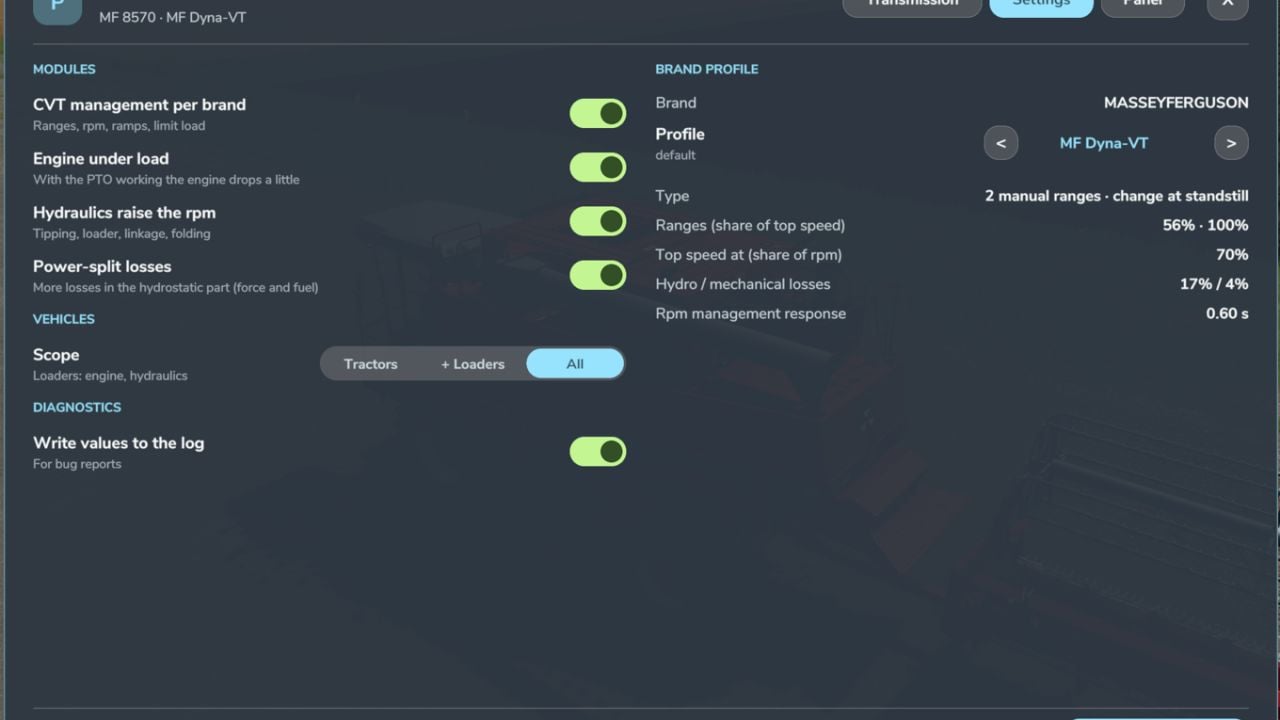
- Pick up realistic CVT behavior for each brand. Fendt Vario and MF Dyna-VT have 2 manual ranges, field / road, and you can change them only at a standstill. CVXDrive on Case IH, Steyr and New Holland, plus JD AutoPowr, CLAAS CMATIC, Deutz TTV, Valtra Direct and Kubota KVT, use 4 automatic ranges with almost unnoticeable shifts.
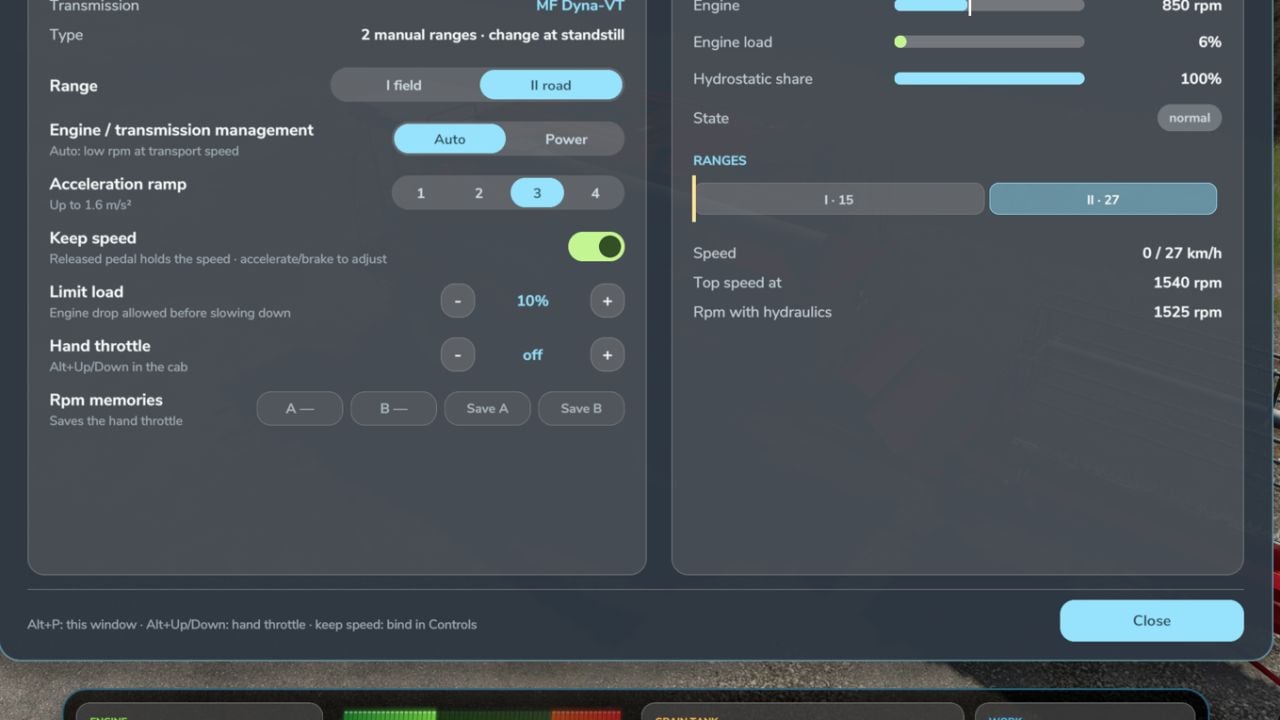
- Engine / transmission management gives you Auto, with economy and low rpm at transport speed, or Power. You can also limit the load and choose acceleration ramps 1 – 4.
- Use the hand throttle with two rpm memories, A / B. They are saved with the savegame, just like on real tractors.
- Power-split efficiency means the hydrostatic part has more losses. You can see that in the pulling force and fuel use.
- With the PTO working, the engine drops a little under load instead of being locked at PTO rpm.
- Hydraulics push the engine rpm up for tipping, loader work, linkage and folding. After that, the engine returns to idle.
- Press Left Alt + P for the own window. The Transmission tab gives you live rpm and target, engine load, efficiency, hydrostatic share and a range strip. In Settings, you can handle the modules, choose which vehicles are used, set the CVT profile per brand and apply it at once. The Panel tab lets you set on / off, text size and mouse movement.
- The CVT module turns itself off when CVT Addon, RealismAddon Gearbox or VCA is active.
- Zasty HUD puts the range and hand throttle on screen. Once the HUD is active, the panel hides.
- Multiplayer supported.
Keys (default)
- Left Alt + P: Real Powertrain window
- Left Alt + Up / Down arrow: Hand throttle (hold)
Those are the default keys. If the game or another mod already has one of them, open Options > Controls and choose the key you prefer, so you can avoid conflicts.
Changelog
- V1.1.2.0
Fixed: rpm and speed needles jumping, especially uphill. Automatic ranges now shift more calmly and stay in one range for at least 2 seconds. Engine rpm now follows the load smoothly instead of hunting.
Improved: rpm no longer drops to “choking” values. Under load, the engine keeps enough rpm to pull. On the road, the minimum sits at about 1150 – 1300 rpm, depending on the tractor. At top speed, ECO stays around 1450 – 1500 rpm.
New: Fendt VarioDrive. The Fendt 600/700/900/1000 now gets one continuous, fully automatic range. The Fendt 200/300/500 keeps the two manual ranges, I Field / II Road, changed at a standstill.
New: deceleration ramps 1 – 4 in the Transmission tab. They control how hard the engine brakes when you let go of the pedal, like a real CVT. Ramp 2 is the game default.
New: keep speed on tractors with a manual gearbox, requested by the community. It starts off by default. Switch it on through Settings > “Keep speed on manual gearboxes”. On these tractors, the mod adds only keep speed, so nothing else changes.
Debug log: it now shows more values. If something still jumps, turn on Settings > “Write values to the log”, drive up a hill and send me your log.txt. - V1.1.1.0
New: Keep speed, asked for by the community. Release the pedal and the tractor holds the speed it had, like the drive lever of real CVT tractors. Accelerate to go faster, brake to slow down, then release again and the new speed is held.
It works forward and in reverse. Going forward, it uses the game’s cruise control. In reverse, the mod presses the pedal for you and adjusts it to hold the speed. It lets go if you accelerate, brake, use the cruise control keys or the tractor stops.
When keep speed lets go, your own cruise control speed is given back.
Turn it on or off in the window with Left Alt + P, Transmission tab. It is saved per player in modSettings.
You can see it on the panel as KS / KS active, and as a chip in the window.
Multiplayer supported.
IMPORTANT – Keep speed has NO default key. To switch it on/off while driving, bind a key in Options > Controls > “Keep speed (on/off)”.
Keep speed works with the CVT management. If it does not work on a combine or another machine with a CVT, open the mod window with Left Alt + P, go to Settings > Vehicles and choose “All”. By default, only tractors are managed.