Want a VAT system for your multiplayer, roleplay or economy setup? VAT System V1.1.0.0 lets purchases, sales and transfers use VAT. You choose the farm that receives it, such as a tax office or a municipality. That makes the money flow part of your farm setup without changing what the system actually charges.
Features
- When you buy something, the price is net by default. The “Added on top” setting puts the VAT on top of the game price you see.
- Switch to “Included in price” and purchases become gross prices too.
- Sales are always gross. Their revenue already contains VAT, which is taken out and sent to the VAT recipient.
- Farm transfers are always gross amounts as well. The farm receiving the money pays the VAT inside the amount.
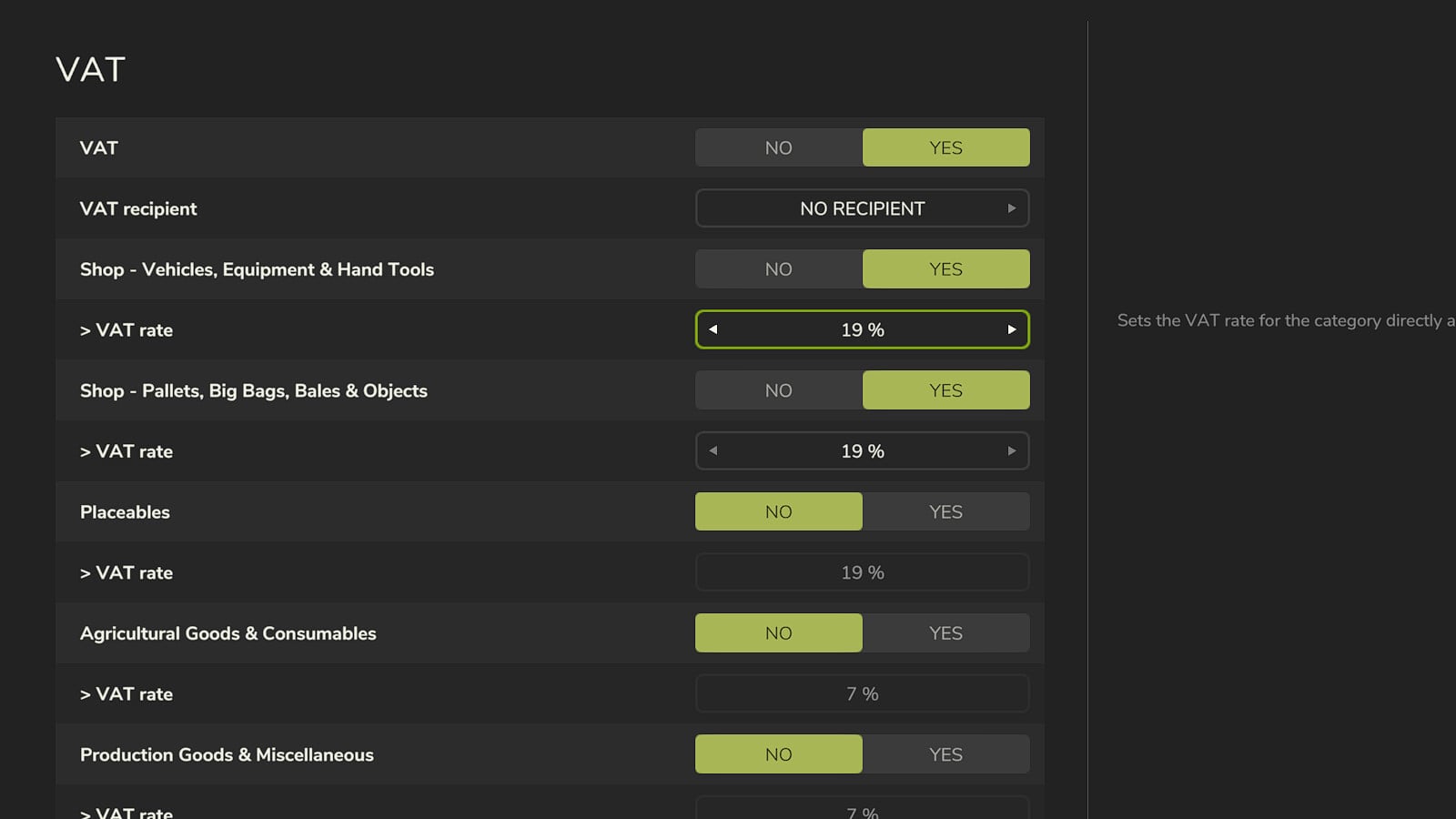
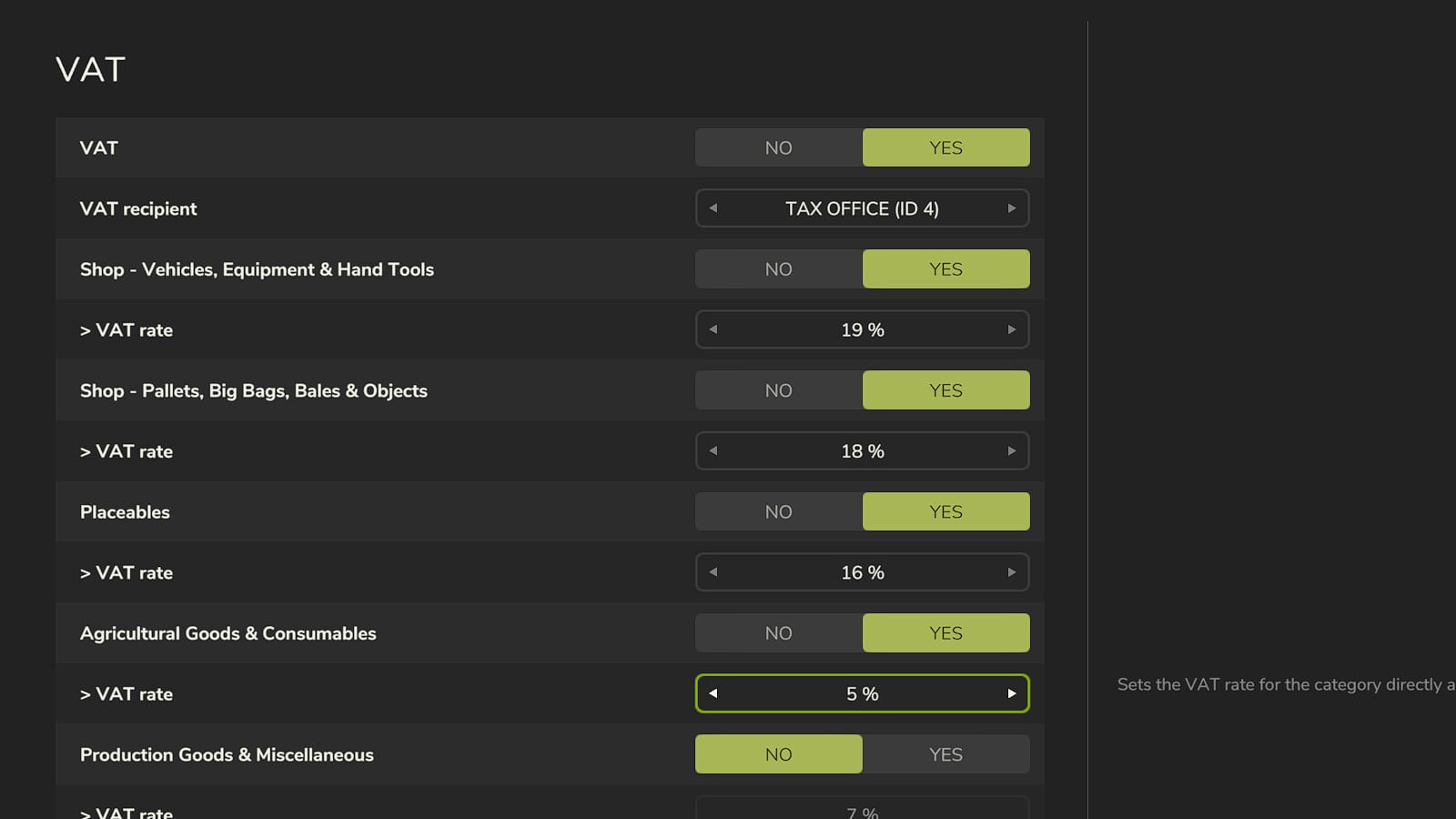
Administrators can find these under game settings > VAT:
- VAT: switch the entire system on or off
- VAT recipient: choose the farm that gets the VAT. If you choose no VAT recipient, the system calculates no VAT.
- VAT on purchases: use VAT for all purchases, including shop, construction menu, buildings, farmland, animals and consumables
- Added on top: the game uses net prices and adds VAT separately.
- Included in price: the game uses gross prices with VAT already inside.
- Turn every category on or off separately and give it a rate from 0 to 30% in 1% steps
Your savegame keeps these settings, and multiplayer synchronizes them.
Categories and their taxed actions:
- Shop – Vehicles, Equipment & Hand Tools, on, 19%: buy in the shop, including used vehicles, and sell
- Shop – Pallets, Big Bags, Bales & Objects, on, 19%: buy in the shop
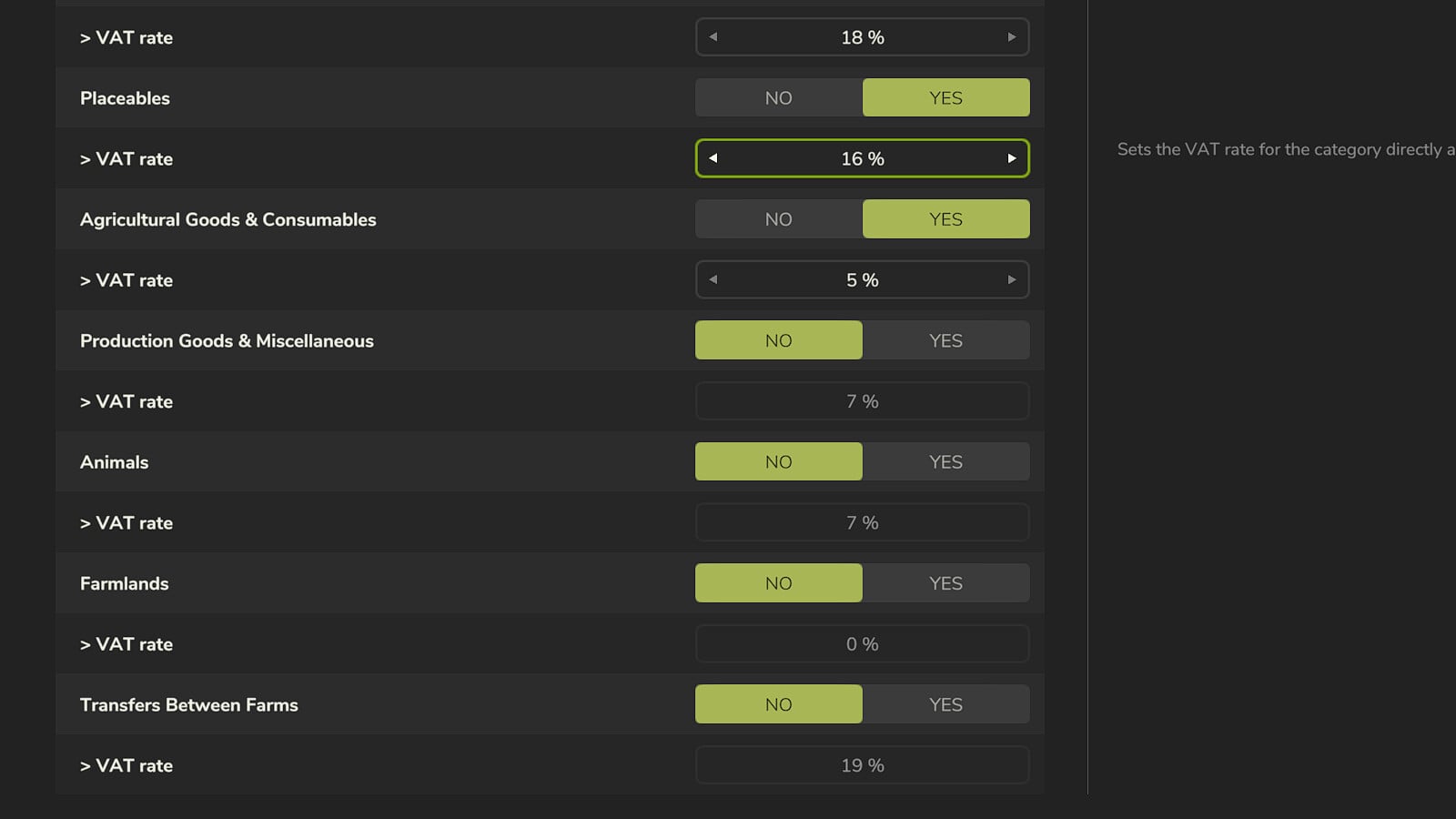
- Placeables, off, 19%: buy through the construction menu, buy existing buildings and productions on the map, and sell
- Agricultural Goods & Consumables, off, 7%: sell crops at selling points and by train
- Production Goods & Miscellaneous, off, 7%: sell every other good at selling points and by train, sell through the production menu, sell directly from productions and make other sales booked directly
- Animals, off, 7%: buy and sell at the animal dealer, including the transport fee
- Farmlands, off, 0%: buy and sell
- Transfers Between Farms, off, 19%: the farm receiving the transfer pays the VAT
- Purchase of Consumables, on, 19%: seeds, fertilizer, lime, fuel, water, consumables and pallets from buying stations, silo refills and helpers’ automatic purchases
The bracketed values are the defaults for a new savegame.
How the numbers work:
- For a purchase in “Added on top” mode, the game books the net amount and charges the VAT separately.
- For a purchase in “Included in price” mode, you pay the displayed amount, and its VAT goes to the VAT recipient.
- Every sale has gross revenue. The VAT inside that revenue is deducted.
- A transfer is gross because the transfer window has no way to show the VAT.
- Amounts are rounded to whole euros. When you unload or fill, fractions carry over so the final total comes out correctly.
Here is the 19% purchase example: a tractor priced at €100,000 net in the game appears in the shop for €119,000. The booking is €100,000 plus €19,000 VAT.
For a 19% sale of €8,000, you keep €6,723 and the VAT recipient gets €1,277.
The farm receiving a transfer gets the full amount and then pays the VAT inside it. At 10%, a €1,000 transfer means €91 goes to VAT and €909 stays with the recipient.
Price displays in “Added on top” mode, net or gross:
- Shop: the prices include VAT. In the cost calculation, the base price and options are net, a separate “VAT” line is shown, and the total is gross. The purchase question names the VAT inside the price. Extra charges for single configuration options are net.
- Construction menu: both the list price and placement price include VAT, but there is no separate VAT line.
- Existing buildings and productions on the map: the purchase question shows the net price and adds “plus … VAT (total …)”.
- Farmland map: the value is net with “plus x % VAT”. For your own land it says “incl. x % VAT”. The purchase and sale question names the VAT.
- Animal dealer: prices are net, while the total line says “plus x % VAT”. When selling, it says “incl. x % VAT”. The purchase and sale question names the VAT.
- Silo refill: both the dialog and purchase question show the net price with “plus … VAT”.
- Buying stations, helper purchases, fuel and water: there is no VAT price display, and the VAT is charged additionally.
- When selling vehicles, placeables and productions, the sale question shows the price with “incl. … VAT”.
- Prices in the price overview and at selling points are always gross, with no hint.
- The transfer window shows gross amounts without a hint.
You see VAT in its own “VAT” message in the top right corner. It also gets its own row in the finance overview.
What stays outside the tax system:
- Leasing, including the leasing fee and running leasing costs
- Running, maintenance and repair costs, helper wages and production costs
- Contract income, missions, loans and interest, and building income and upkeep
- Free items
- Purchases and sales made by the VAT recipient itself, plus payments from that farm to other farms, for example subsidies
- Categories that are off or set to 0%
- Purchases and sales from other mods that use their own buying or selling systems instead of the game functions
The last two entries apply only in multiplayer. The single player setup is explained below.
Notes:
- Fresh savegames begin with “Added on top”. A savegame from version 1.0.0.0 keeps “Included in price”, and its new “Purchase of Consumables” category stays off until an administrator switches it on.
- With “Added on top”, some purchases only check whether you have enough money for the net price. Because of that, your balance can go slightly below zero after buying.
- A production set to “Sell” automatically sells its goods every full hour. VAT is taken from these sales too, using Production Goods & Miscellaneous. You do not see a price first, and the VAT only appears in the finances.
- In multiplayer, the server books the VAT. The server and all players must have the same mod version.
- Single player: select your own farm as VAT recipient. It represents the state, so VAT still gets charged but is credited to no farm. The mod is most useful in multiplayer when a separate farm is the VAT recipient.
Important:
This fictional tax system is for gameplay and roleplay purposes.
It does not describe the tax law of any specific country, for example there is no input tax deduction, and it is not tax or legal advice.
Changelog
1.1.0.0:
- New setting “VAT on purchases”: put VAT on top of the purchase price, use net prices, or have it included in the price
- New category “Purchase of Consumables” covering buying stations, silo refill, helper purchases, fuel and water
- VAT now works for selling vehicles, equipment, hand tools, placeables and farmland
- VAT now works when buying existing buildings and productions on the map
- VAT now works for sales by train, sales from the production menu and direct production sales
- Productions set to “Sell” also pay VAT on their automatic hourly sales, with nothing displayed beforehand
- Transfers: the receiving farm gets the full amount and pays the VAT, while the VAT recipient’s payments are tax-free
- Shop: prices include VAT and the cost calculation has its own VAT line
- Construction menu: prices include VAT
- VAT is displayed on the farmland map, at the animal dealer and for silo refill
- The purchase and sale questions name the VAT, including the silo refill question
- Single player: the own farm represents the state as VAT recipient, so VAT is charged but credited to no farm
- Multiplayer: the VAT recipient farm sees no VAT displays because it does not pay VAT
- Compatible with Precision Farming, farmland map with price per hectare
- VAT now appears as a separate message in the top right corner and as one summary message when unloading
- Fixed: unloading VAT was rounded down at each step, making it too low
- Fixed: an error when saving savegames that had not been saved yet
- Description and tooltips revised
1.0.0.0:
- Initial release
Only download this mod from the official Farming Simulator ModHub, and keep the original link.
Reuploading, redistribution, modification or copying of this mod or any of its files, in whole or in part, is not allowed without the author’s written consent.