Weather Wardrobe handles outfit changes for you, your workers and your employees. It checks the weather, the temperature and the season presets, then uses that setup for the clothing change.
Features
-
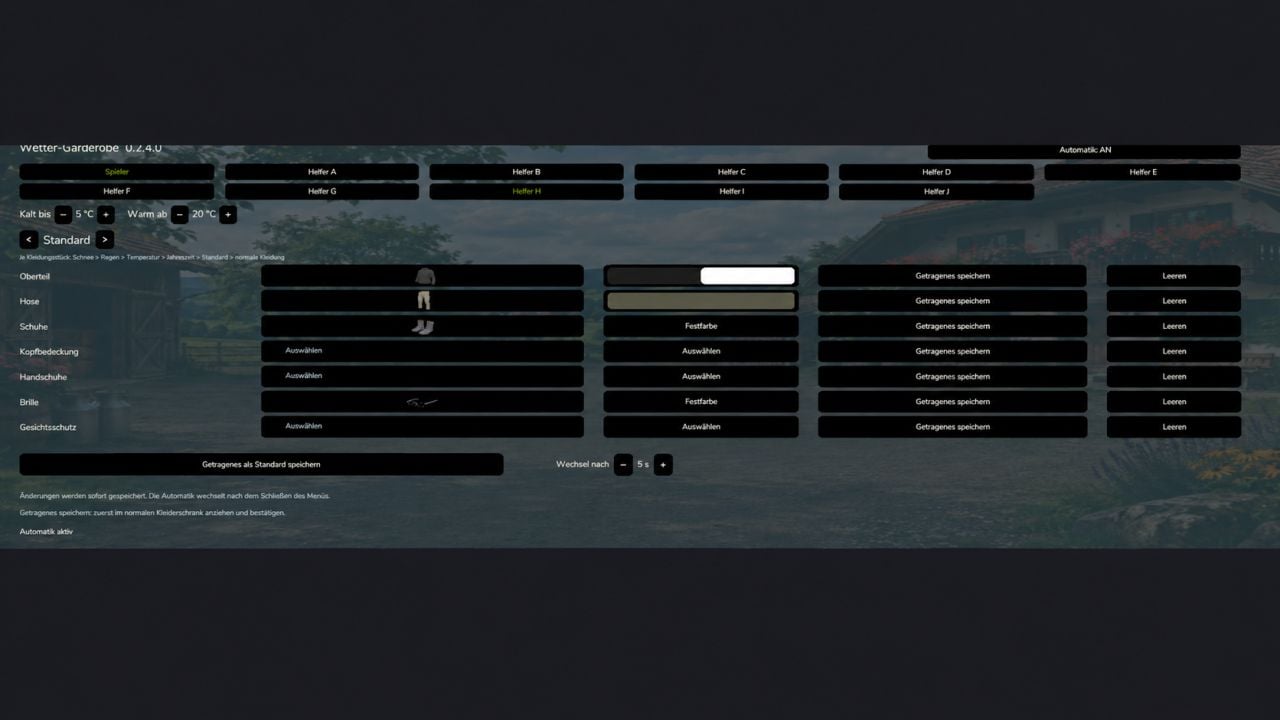
Start in the wardrobe and open the Weather Wardrobe tab.
At the top, pick Player or a Worker.
Switch automation on for that person.
Choose the temperature where the setup should count as cold or warm.
Now pick a preset such as Rain, Winter or Warm, and choose its clothing and colors.
The setup saves by itself. Close the menu, then let the time under “Change after” run out. -
Any clothing item you leave unassigned is taken from another suitable preset.
If several presets cover the same thing, the order is Snow → Rain → Temperature → Season → Default.
“Save worn clothing as default” puts the clothing and colors you are wearing into the Default preset.
The Player preset “Riding” takes priority for the selected items while you are on horseback. Get off the horse and the weather clothing is active again. -
Here is the setup with PlayerWorkers:
1. Turn on Weather Wardrobe and PlayerWorkers in the savegame.
2. Open Weather Wardrobe from the wardrobe tab.
3. Choose Player, enable automation for the player, and set the clothing, colors and weather thresholds.
4. Close the menu and wait for the selected change time to elapse.PlayerWorkers takes the clothing your player currently wears and uses it for the workers. That means separate worker presets do not apply. With PlayerWorkers running, the Worker and Employee buttons both take you to the player configuration.
-
No visible change yet? Check the player’s outfit first: Is automation enabled, is a suitable preset ready, and does the current weather meet the condition?
Multiplayer: PlayerWorkers copies each local player. So the same worker can look different to different players.
-
Employees work with this setup:
1. Enable Weather Wardrobe and Employees in the savegame.
2. Set up your employees normally through Employees.
3. Open the Weather Wardrobe tab in the wardrobe.
4. Pick the employee with their name button, for example “Robin (A)”.
5. Enable their automation and set the presets, colors, temperature thresholds and change time.You can set the clothing before the work starts. The moment the employee is assigned as a driver, the appropriate outfit is used.
- Presets stay with the assigned worker slot. If that worker is renamed or replaced, the settings stay there.
- Employees still takes care of tasks, contracts, wages and working hours.
- For multiplayer, worker presets synchronize within the respective farm. Everyone taking part needs the same Weather Wardrobe version.
- If PlayerWorkers is active too, employees use the player’s clothing as well. Their own employee presets are then not applied.
Changelog
- BETA 4
– NEW DESCRIPTION, READ
– Bug fixes for the PlayerWorker-Mod and Employee-Mod
– UI adjustments for clearer use.
– Added the “Tab” preset. - BETA 3
Mod adapted for:
– Player Workers
– Employees
– further minor bug fixes.
I have not tested the integration myself yet. Tell me if you run into any errors. It should work so far. - BETA 2
– AI helpers can now be customized, from helpers A to J.
– Some errors are fixed now, especially in the multiplayer area.